Manual send
Every client is another chat. Copy the link, hunt the folder, “did you get it?”. Hours go to shipping, not creating.

Studio software · Mac & Windows · not a courier · 14-day free trial
The client writes once. Delivery never bothers you again.
Email or WhatsApp is enough. TeslimX finds the job, verifies the person, and sends the download in your name. Photo, video, render, drone, corporate packs — all file delivery. You stay on set, at the desk, in the office.
You’re away
Delivery still goes out
0 upload
Never hits the cloud
OTP
Never the wrong person
14 days
No license key needed
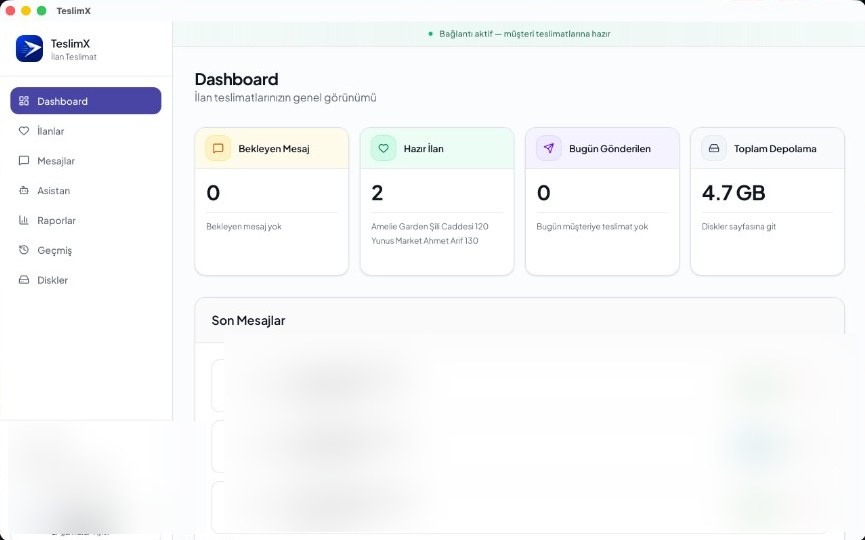
TeslimX desktop app — Mac and Windows, ready to deliver.
The shoot ends. The render ends. The cut ends. Then the same scene: “where are my files?”, Drive folders, WeTransfer limits, USB couriers, crushed video. TeslimX closes that scene for you.
Manual send
Every client is another chat. Copy the link, hunt the folder, “did you get it?”. Hours go to shipping, not creating.
Wrong person
Same name, old number, wrong project. Raw files don’t come back. Reputation goes with them.
With TeslimX
The client writes. The software answers in your name, verifies, and sends. You keep producing.
The client reaches you. TeslimX finishes delivery. Portrait, product, commercial, villa, architectural render, agency handoff — same engine.
01
The client writes
Email or WhatsApp. “Are my files ready?” is enough. They don’t learn a new app.
02
The job is found
AI matches name, date and folder on your disk. You don’t search.
03
The person is verified
Phone, email, OTP. It doesn’t go to the wrong person. Security is built in.
04
The link goes in your name
The pack is ready, the download is sent. Delivery is done. You may still be on set.
No single niche. TeslimX gets every project on your disk to the right client.
Portrait, product, fashion, family, corporate. Album ready — delivery starts when they write.
Ads, clips, events, corporate film. 4K packs download from your disk, not the cloud.
Renders, tours, decks. The client writes from the office; the pack goes in your name.
Listing photos, aerials, villa tours. The agent waits — you’re already on the next shoot.
Campaign folders, print files, motion. Delivery happens before “where’s the final?”
Pick the general workspace. The core never changes: the right files, the right person, on your behalf.
No cloud upload. Raws, 4K, heavy renders stay on your Mac or Windows PC and drives. The client only gets a download.
AI greets the client. You’re shooting, in a meeting, on the road — delivery still goes out.
OTP and contact match. The project doesn’t land on the wrong number.
Built by Symetra Media. Istanbul, Izmir, Antalya, Konya — any studio with a Mac or Windows PC downloads, tries 14 days, licenses if it stays.
Those are a box. TeslimX is an assistant.
| WeTransfer / Drive / USB | TeslimX | |
|---|---|---|
| Who sends? | You. You upload and share by hand. | The software sends on your behalf. |
| What does the client do? | Wait, chase, remind. | Write. Delivery starts. |
| Where do files live? | In the cloud or on a USB. | On your computer and disks. |
| Wrong person? | A copied link walks away. | OTP + contact match. |
| While you’re on set? | Delivery waits. | Delivery still goes out. |
WeTransfer cap, WhatsApp crush, wedding pack, render — one page per search.
1. Download
Install on Mac or Windows. The 14-day trial starts with no license key.
2. Attach the folder
Point it at your archive. It recognises projects — photo, video, render, anything.
3. Let it deliver
When the client writes, delivery goes out for you. License it if you keep it.
The window that opens is the installer disk, not the app. Don’t run TeslimX from inside that disk — ejecting it would remove the app.
The installer is an .exe. Run it from Downloads. SmartScreen may warn you — that does not mean the app is broken.
Pay 10 months, get 2 free on annual. The key arrives on WhatsApp or email.
Starter
5.000 ₺ / mo
₺50,000 / year · 2 months free
8.000 ₺ / mo
₺80,000 / year · 2 months free
Symetra Media · Ankara · kurumsal.symetramedia@gmail.com